Are you looking for the Infinite Campus CCSD login to check grades, attendance, assignments, or your child’s school schedule? The Clark County School District (CCSD) in Nevada uses Infinite Campus as its student information system, giving parents, guardians, and students access to important academic records through a secure online portal.
Whether you’re a parent checking your child’s progress or a student reviewing your classes, knowing which login portal to use can make the process easier. CCSD provides two main options: Campus Parent for parents and guardians and Campus Student for students.
Some users also search for Infinite Campus Hawaii when looking for the same platform in another school district. However, Hawaii has a separate Infinite Campus login system, so its portal should not be confused with the Clark County, Nevada portal.
In this guide, you’ll learn how to access CCSD Infinite Campus, sign in to the parent and student portals, create an account, use the mobile app, check grades, and troubleshoot common login problems. You’ll also find the official Hawaii portal information.
What Is Infinite Campus CCSD?
Infinite Campus CCSD is the student information system used by the Clark County School District in Nevada. It provides a centralized platform where authorized parents, guardians, and students can view school-related information.
The system works as an electronic gradebook and online portal. Instead of relying only on printed progress reports or waiting for school updates, families can use their accounts to review available academic information.
According to CCSD, the portal can provide access to:
- Student grades and gradebook updates
- Attendance records
- Class schedules
- Assignments and academic planners
- Report cards and academic reports
- District and school notices
- Fees and payments
- Cafeteria balances and school meal information
- Health information related to immunizations
The information available may depend on the student’s school, account permissions, and the features enabled by the district. Clark County School District+1
Infinite Campus CCSD Login: Official Portal Links
The first step is choosing the correct portal. Parents and students have separate login options, even though both use the Infinite Campus system.
| Portal | Official login |
|---|---|
| Campus Parent | CCSD Parent Login |
| Campus Student | CCSD Student Login |
| CCSD Infinite Campus information | Official CCSD website |
These links are for Clark County School District users in Nevada. If you attend a school in another district, you may need a different Infinite Campus portal. campus.ccsd.net+2
How to Log In to Infinite Campus CCSD
Before signing in, make sure you have the username and password provided or authorized by your school. Use the parent or student portal that matches your account.
1. CCSD Infinite Campus Parent Login
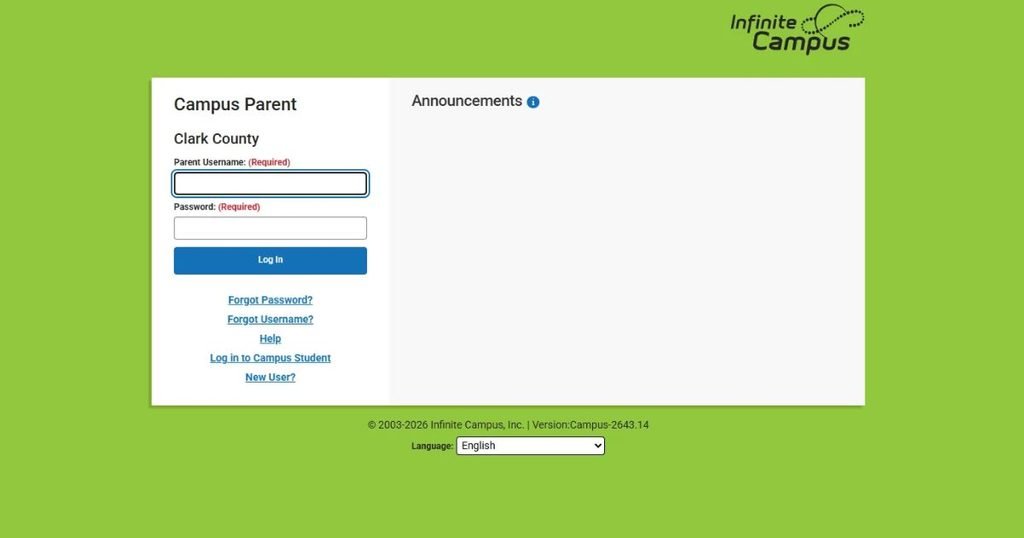
Campus Parent is designed for parents and legal guardians who want to monitor a student’s academic information.
Follow these steps:
- Open the official CCSD Campus Parent login page.
- Check that the page identifies the district as Clark County.
- Enter your Parent Username.
- Type your password.
- Select Log In.
- After signing in, choose the relevant student if your account is connected to more than one child.
- Open the available sections to review grades, attendance, assignments, or schedules.
Parents should use their own authorized account rather than a student’s login details. If you have not received access, contact your child’s school Campus Liaison.
2. CCSD Infinite Campus Student Login
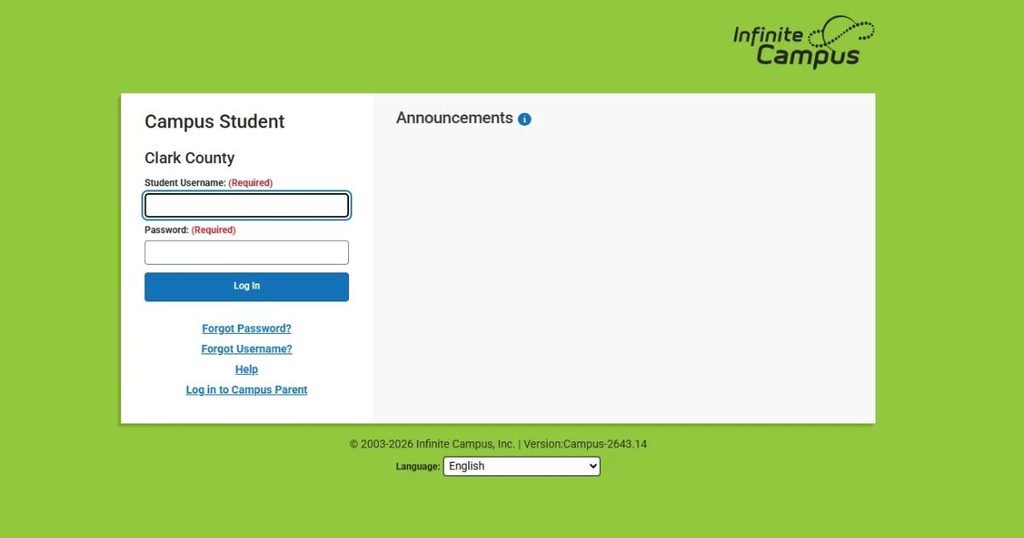
Students should use Campus Student to access their own school information.
To sign in:
- Visit the official CCSD Campus Student portal.
- Confirm that the district shown is Clark County.
- Enter your Student Username.
- Enter your password.
- Click Log In.
- Open the available sections to check grades, assignments, attendance, and your class schedule.
If your username or password does not work, follow the recovery options displayed on the login page. Students who cannot access their accounts should also contact their school for assistance. campus.ccsd.net+2
How to Create an Infinite Campus CCSD Parent Account
First-time users may need to get their Campus Parent account created or activated before they can sign in.
CCSD’s account-access instructions explain that new parent accounts are created through the school’s Campus Liaison. Therefore, parents should not assume they can independently register without the information provided by their child’s school. Cloudinary+1
Steps for New Parents
- Contact your child’s school and ask for Campus Parent access.
- Request the account details or activation instructions required by the school.
- If the school provides an activation key, follow the instructions on the portal.
- Open the official Campus Parent login page.
- Enter the username and password provided or created during activation.
- Follow any prompts to update your password.
- Add an account security email address if requested.
- Complete the email verification process, if prompted.
- Sign in using your updated credentials.
Already have an account? You may not need to create another one. CCSD’s 2026–2027 back-to-school information states that parents and guardians with an existing Campus Parent account can continue using their previous username and password. Clark County School District+1
How to Use the Infinite Campus CCSD Mobile App
Parents and students can also access Infinite Campus through mobile applications. CCSD provides two separate apps:
- Campus Parent: For parents and guardians.
- Campus Student: For students.
Both applications are available at no cost through the Apple App Store and Google Play Store, according to CCSD. Clark County School District
Steps to Set Up the Mobile App
- Open the Apple App Store or Google Play Store.
- Search for Campus Parent or Campus Student.
- Download the appropriate official app.
- Open the app.
- Enter CCSD as the district name.
- Select Nevada as the state.
- Search for the district and choose Clark County.
- Enter your authorized username and password.
- Tap Log In.
The app provides access to supported school information, such as grades, attendance, assignments, and schedules. Push notifications may also be available when supported and enabled.
Only use the Stay Logged In option on a personal device that other people cannot access.
How to Check Grades and Attendance on CCSD Infinite Campus
One of the main reasons families use the portal is to monitor academic progress.
Checking Student Grades
To review grades:
- Sign in to Campus Parent or Campus Student.
- Open the Grades or Grade Book section.
- Select the appropriate student or course, if applicable.
- Choose the available grading period.
- Review the displayed grades and assignment information.
Gradebook information can change when teachers enter new scores or update existing records. If a grade looks incorrect or an assignment is missing, contact the teacher rather than assuming the portal is displaying a final result.
Checking Attendance
Parents and students can also review recorded attendance information.
- Sign in to the appropriate Infinite Campus account.
- Open the Attendance section.
- Review the available attendance records.
- Check the dates associated with absences or tardiness.
- Contact the school if you notice an incorrect entry.
The portal displays information entered into the district’s system. For questions about a specific absence or attendance correction, the school is the appropriate place to request clarification.
Viewing Assignments and Class Schedules
The portal can also help students organize their schoolwork.
Depending on the information made available by the school, users may be able to:
- Review course schedules.
- Check assignment details and scores.
- View academic planner information.
- Monitor gradebook updates.
- Access available academic reports.
Parents can use these details to discuss schoolwork and upcoming responsibilities with their children. Clark County School District+1
Infinite Campus Hawaii: Official Parent and Student Login
People searching for Infinite Campus Hawaii are generally looking for the Hawaii Department of Education’s version of the platform.
Hawaii has a separate Infinite Campus portal. It is not the same login page used by Clark County School District in Nevada. The official Hawaii login pages identify the district as the Hawaii Department of Education. hawaii.infinitecampus.org+1
Here are the relevant portal links:
| Hawaii portal | Official login |
|---|---|
| Campus Parent | Hawaii Parent Login |
| Campus Student | Hawaii Student Login |
How to Log In to Infinite Campus Hawaii
If you’re a parent or student in Hawaii:
- Open the appropriate Hawaii portal link above.
- Confirm that the page identifies the Hawaii Department of Education.
- Choose Campus Parent or Campus Student, depending on your account.
- Enter your assigned username.
- Type your password.
- Select Log In.
- Review the information available to your account.
If you are a new user or cannot access your account, contact your school for the correct account setup and support instructions.
Important: Do not use your CCSD Nevada username or portal link to access a Hawaii school account. The two districts have separate login systems.
Infinite Campus CCSD Login Not Working? Common Problems and Fixes
Login issues can happen because of incorrect credentials, account setup problems, browser errors, or temporary technical difficulties.
Here are some common problems and practical steps to try.
| Problem | Possible solution |
|---|---|
| Incorrect username or password | Check your credentials and make sure you selected the correct portal. |
| Forgotten password | Select Forgot Password on the login page and follow the instructions. |
| Forgotten username | Use the Forgot Username option if available. |
| New account not activated | Contact your school’s Campus Liaison. |
| Mobile app cannot find the district | Select Nevada and search for Clark County. |
| Student information is missing | Ask the school to verify your account access and student association. |
| Portal page is not loading | Check your internet connection, try another browser, or retry later. |
| Grades or attendance look incorrect | Contact the teacher or school office for clarification. |
How to Reset Your Infinite Campus Password
If you cannot remember your password, try the following:
- Open the correct CCSD Campus Parent or Campus Student login page.
- Select Forgot Password?
- Follow the instructions displayed.
- Use your registered account security email if requested.
- Complete the recovery process and create a new password if prompted.
- Return to the login page and try signing in again.
If the recovery option does not work, contact your school’s Campus Liaison or the CCSD Portal Help Desk. CCSD’s support information explains that school staff can help with portal access and account-related issues. Clark County School District+1
CCSD Infinite Campus Support: Phone Number and Email
If you have tried the available recovery options and still cannot access your account, contact the district or your child’s school.
CCSD publishes the following Portal Help Desk details:
- Phone: 702-799-7678
- Email: 0068-SDM-portalsupport@nv.ccsd.net
- Support hours: Monday–Friday, 6:00 a.m.–5:00 p.m. Pacific Time
You can also contact the Campus Liaison at your child’s school during school hours. Check the official CCSD Parents & Students page for current support information. Clark County School District+1
Tips for Using Infinite Campus CCSD Effectively
A few simple habits can help parents and students get more value from the portal.
Check grades regularly: Reviewing gradebook updates periodically can help families identify questions before the end of a grading period.
Review attendance records: Check recorded absences and tardiness, and contact the school if something needs correction.
Keep login details private: Do not share your username or password with people who are not authorized to access your account.
Use the correct portal: Parents should use Campus Parent, while students should use Campus Student.
Keep recovery information updated: A working security email can make account recovery easier when that option is available.
Use official links: Access the portal through CCSD’s website or the official login pages rather than unfamiliar websites.
Frequently Asked Questions About Infinite Campus CCSD
Infinite Campus CCSD is the student information system used by the Clark County School District in Nevada. It allows authorized parents, guardians, and students to access grades, attendance, schedules, assignments, and other school information.
Visit the official CCSD Infinite Campus page and select Campus Parent or Campus Student. You can also use the direct login links provided in this guide.
Yes. Campus Parent is designed for parents and guardians, while Campus Student is intended for students. Each user should sign in with the credentials associated with their own account.
Contact your child’s school and request access through the Campus Liaison. The school will provide the account details or activation instructions required to get started.
Yes. Parents can use the Campus Parent app to review available grades, attendance, assignments, and schedules. The information displayed depends on what the district and school make available.
CCSD states that Campus Parent and Campus Student are available to parents and students at no cost. Clark County School District+1
No. Hawaii and Clark County School District have separate Infinite Campus portals. Hawaii users should select the Hawaii Department of Education portal, while CCSD users should use the Clark County login.
First, check your username and password and confirm that you are using the correct portal. Try the Forgot Password or Forgot Username option if available. If the problem continues, contact your school Campus Liaison or the CCSD Portal Help Desk.
Conclusion
Infinite Campus CCSD gives Clark County School District parents, guardians, and students a convenient way to access important academic information. Through Campus Parent and Campus Student, authorized users can review grades, attendance, assignments, schedules, and other school records.
To get started, choose the correct CCSD login page and enter your authorized account credentials. If you are a first-time parent user, contact your child’s school for account setup instructions.
If you’re searching for Infinite Campus Hawaii, remember that Hawaii uses a separate portal for its Department of Education. Always select the correct district before entering your login details.
Last reviewed: November 2026. This is an independent informational guide and is not affiliated with or endorsed by Clark County School District, the Hawaii Department of Education, or Infinite Campus, Inc. Portal features and support details may change.